Popular Cricut Fonts That Go Together
Project Overview
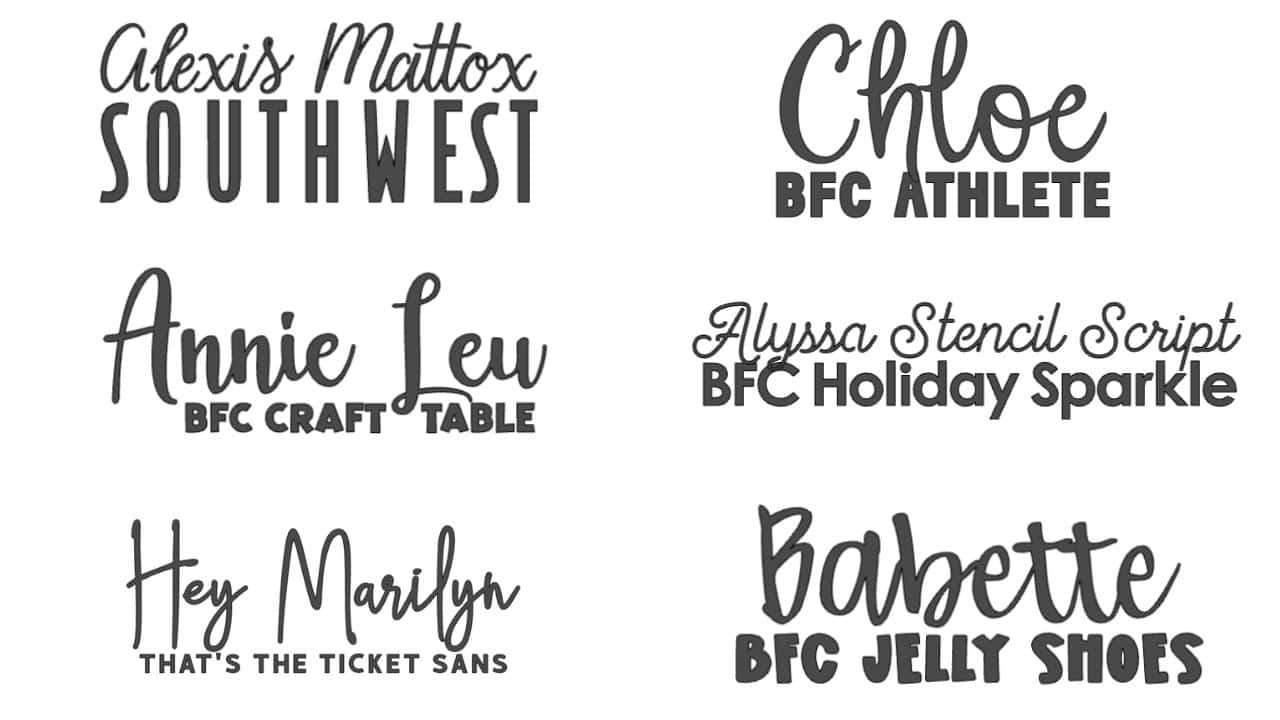
Need help picking Cricut fonts that go together? These popular combos take the guesswork out so your designs look polished right from the start.
Don't you love it when inspiration strikes and you have a perfect idea for a craft project!
You grab your computer (or device) and log in to Cricut Design Space to bring your idea to life.
But wait, your project includes fonts, and there are so many font choices in CDS. How will you ever decide?
I've been there too. Font searching isn't my favorite; I'd rather get to the making!
That is precisely why I created this list of font combinations. These are the best Cricut fonts and are a part of Cricut Access.
Using a font combination is an easy way to scale up your project.
Two complementary fonts can really make your project pop! But don't overdo it. Too many fonts can make a project look messy and confusing.
I try to only stick to two fonts in a project, and here are some of my favorite combinations.
All of these fonts are Cricut fonts, and the font name is shown to keep it easy.
Want to know the secret to pairing fonts yourself? It's easier than you might think!
I start by finding a font I really like, and then I look for its opposite.
I usually start with the script font that has more character to it. If it is a thinner font, I look for a chunkier, block letter font to complement it.
If the first font is thicker, then I look for a thinner font as the second.
And size does matter! You may love a font combination, but when sized for the project, it just doesn't look right. That's okay. Try finding a different second font that still complements.
The best way to search for fonts is to open a text box, type your words, and then click the font box. Then, as you go through the fonts, it displays your words in the various fonts.
There are a lot of fonts! If you are looking for something specific, it can be helpful to use the filters to narrow down the fonts.
You can narrow the style of the font, as well as Cricut fonts, writing fonts, and single or multi-layer cutting fonts.
Cricut fonts are categorized into two types: free fonts and paid fonts. You can tell by looking at the font section.
The top font, Cricut Sans, is free because there is no cost listed.
The Cricut Sans Stencil has a price and a green A. That means you can either purchase it, or if you have Cricut Access, you can use it with no additional fees.
Cricut fonts are exclusive fonts that are only available in Cricut Design Space.
There are so many fun and amazing things that you can do with the Cricut machine, but when it comes to choosing the best fonts, you need to be a little picky.
How will you be using the fonts? Will you be writing them or cutting them? Plus, how large or small is your Cricut project?
There are different types of fonts for each of these questions.
Writing fonts are single-line fonts that are used with the Cricut writing tools.
You can use these fonts when writing your text with a Cricut Pen or marker, and with the foil transfer kit.
You cannot cut these fonts out by themselves.
When looking for Writing Fonts, tap on the filter in the fonts section, and you can select Writing Fonts. This will show you what writing fonts are available to you.
Most of the fonts in Cricut Design Space are cuttable, so you don't need to add a filter to find them.
Cutting fonts are denser, which allows the blade to go around each letter or word and cut them out.
Always think of your final project size when selecting fonts. Script fonts can be challenging to weed if they are cut very small.
If working on a small project, I recommend block letters that are easier to weed when cut small.
Kerned fonts are where the letters are already spaced just right, so they look natural and connected, especially in script or cursive styles.
That means no fiddling with ungrouping or nudging each letter around.
Just type it out and you're good to go. They are a good time-saver.
Cricut Accessis a monthly subscription program that works alongside your Cricut Cutting Machine and Cricut Design Space.
The monthly Standard plan is $9.99 a month, and the Premium Plan is also $9.99 a month, but you pay yearly.
With both plans, you get access to over 200,00 graphics, 700 fonts, as well as discounts and exclusive deals.
With the Premium, you also get 20% off your materials purchases and free shipping on orders over $50.
When looking through Cricut Design Space's images and fonts, everything with the green A in the upper right corner is included with Cricut Access.
Learn more about, or sign up for Cricut Access.
BUT, you don't need to have a subscription to use your Cricut and Cricut Design Space. It is an excellent option for avid crafters who produce a large quantity of items.
Now that you're a font pairing pro, let's make something fun! Here are a few great ideas!
Hi, I'm Katie!
I'm so glad you're here. Want to make something fabulous? I'm here to help!
Materials Needed
- Colored cardstock or patterned paper
- Craft scissors or paper cutter
- Double-sided tape or glue stick
- Ruler and pencil
- Decorative elements (ribbons, stickers, washi tape)
- Cutting mat
- Scoring tool or bone folder
- Embellishments (buttons, sequins, stamps)
Step-by-Step Instructions
Prepare Your Materials
Gather all the required materials and tools. Make sure you have everything listed in the materials section before starting.
Set Up Your Workspace
Find a clean, well-lit area to work. Cover your surface with newspaper or a craft mat to protect it.
Follow the Main Steps
Carefully follow the instructions step by step. Take your time and don't rush through any part of the process.
Add Personal Touches
Once you've completed the basic project, feel free to add your own creative touches and personalization.
Final Assembly
Put all the pieces together according to the instructions. Double-check that everything is secure and properly attached.
Pro Tips
💡 Tip: Take your time and enjoy the creative process
💡 Tip: Don't be afraid to experiment with different colors or materials
💡 Tip: If you make a mistake, don't worry - it's all part of learning
💡 Tip: Share your finished project with friends and family
💡 Tip: Take photos of your progress to document your crafting journey
You Might Also Like
References & Further Reading
Explore these trusted resources to deepen your crafting knowledge and find more inspiration for your next project.
- Do It Yourself — Wikipedia Overview of DIY culture, history, and common techniques across woodworking, home improvement, and crafting.
- Handicraft — Wikipedia Background on traditional handicrafts, materials, and the cultural significance of handmade goods.
- Instructables Community-driven DIY project library with step-by-step photos, videos, and printable instructions.
- Woodworking — Wikipedia Techniques, tools, joinery methods, and the history of working with wood as a craft.
- Sewing — Wikipedia History and modern practice of sewing, including stitches, equipment, and fabric choices.
- Bob Vila Trusted home improvement, tool reviews, and illustrated how-to guides from a household name.
- Papercraft — Wikipedia Art forms that use paper as the primary medium, from origami to paper-mache.
- Michaels — Project Ideas Project walkthroughs, material lists, and weekly craft ideas from a major arts & crafts retailer.